


Most tax guides for Filipinos tell you to file by April 15 and stop there. They skip the April 30 AFS eSubmission deadline. They don’t explain what to do with your 2307 from Shopee. Nobody warns you that a mismatch between what the platform reported to BIR and what you declared is one of the fastest ways to get your account flagged.
I’ve been through this process as a sole proprietor. Here’s the full picture.
What is BIR Form 1701A and who needs to file it in 2026?
Form 1701A is the Annual Income Tax Return for Filipinos earning income purely from business or profession. Freelancers, sole proprietors, and online sellers with no employer file this form. The deadline is April 15, 2026.
| Form | Who files it |
|---|---|
| 1701A | Purely self-employed: freelancers, sole proprietors, online sellers |
| 1701 | Mixed income: has employment AND business or freelance income |
If you had any employment income during the year; even for a few months – you file Form 1701, not 1701A. Newly transitioned freelancers miss this every year. Check your income sources before choosing the form.
What do you need before opening eBIRForms?
Five things. Have all of them ready before you open the software. The session times out if you step away mid-form.
| What you need | Why |
|---|---|
| eBIRForms package (latest version) | The filing software: Windows only, free at bir.gov.ph |
| Certificate of Registration (COR) | Your TIN, RDO code, and Line of Business |
| Total gross sales for the year | Item 47: full annual figure, not quarterly |
| Quarterly payment records (Q1–Q3) | Item 58; taxes you already paid this year |
| 2307 from platforms or clients | Creditable withholding from Lazada, Shopee, or other payers |
eBIRForms runs on Windows only. Mac users need a virtual machine or a visit to their RDO. There is no official Mac version as of 2026.
Should you use the 8% flat rate or the graduated tax table?
For most freelancers and online sellers under ₱3 million in annual gross sales, the 8% rate wins. It covers both income tax and the 3% Percentage Tax in one calculation, so you skip the quarterly 2551Q filings entirely. The math: (Gross Sales – ₱250,000) × 8%.
The graduated table makes sense only when your cost of goods is high enough that taxing gross sales would hurt your margins. Physical inventory businesses are the exception. Developers, writers, VAs, and most Lazada/Shopee sellers running lean operations, the 8% rate is simpler and usually cheaper. Skipping the quarterly 2551Q alone saves several hours a year.
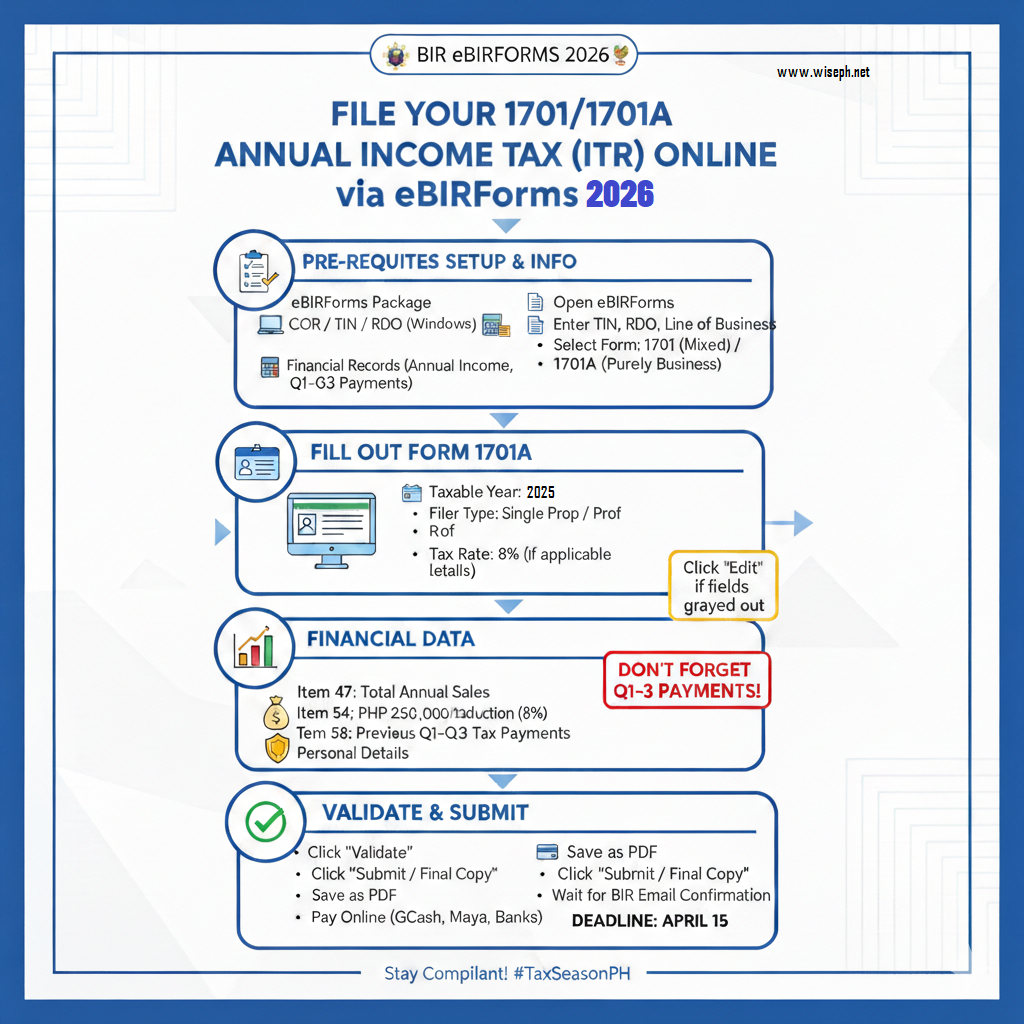
How to fill out Form 1701A in eBIRForms: step by step
Open eBIRForms, enter your TIN, RDO code, and line of business from your COR. Select Form 1701A from the dropdown menu.
Basic information tab
Set Taxable Year to 2025. Choose your filer type: “Professional” or “Single Proprietor.” If you’re on the 8% rate, select it in the Tax Rate field, this auto-updates Item 19. Fill in your birthdate, citizenship, and civil status.
Financial data section
If fields appear grayed out, click “Edit” to unlock them.
- Item 47; Total Sales/Receipts: Your full-year gross income, January through December. Not your Q4 figure. Your total for the entire taxable year.
- Item 54; Deduction: The ₱250,000 exemption auto-populates once you select the 8% rate.
- Item 58; Previous Tax Payments: The total of all quarterly payments from Q1, Q2, and Q3. This is the field first-time filers skip most often. Miss it and you pay those quarters again on top of what you already paid.
How to enter your 2307 from Lazada, Shopee, or other platforms
Form 2307 is the Certificate of Creditable Tax Withheld at Source. Lazada, Shopee, and any client who withheld tax from your payments should issue you one. The withheld total reduces your final tax due – it goes in the creditable withholding tax section of the form.
Add up all 2307s you received for the year. Multiple platforms, one combined figure entered in the form.
The part most guides skip entirely: the 2307 total you enter must match what those platforms actually reported to BIR. Lazada and Shopee file their own reports with the bureau. A significant discrepancy between what they reported and what you declared in your quarterly filings is one of the most common reasons online sellers get flagged for a BIR audit. Reconcile any gaps before you submit, not after.
Request your 2307 from each platform’s seller portal before you open eBIRForms. Seller support processing can take a few days. Do not estimate the amount. Do not scale up last quarter’s figure.
How to validate and submit your 1701A
Click “Validate” at the bottom. The system flags empty required fields. Fix any issues flagged, then save a local copy of the completed form.
Click “Submit / Final Copy.” The confirmation message reads “Submit Successful.” If you get an error on the first attempt, click submit again without restarting the form — this resolves most submission errors without any changes needed. After successful submission, click “Print” and save the output as a PDF. You need that file for the AFS eSubmission step.
What is BIR AFS eSubmission: and what documents do you need?
AFS eSubmission is BIR’s separate portal for attaching supporting documents after you file your 1701A. The deadline is April 30 — 15 days after April 15. Filing your 1701A on time does not mean you’re done. BIR treats the return as incomplete until the attachments arrive in the system.
| Document | Why it’s required |
|---|---|
| Form 2307 from platforms/clients | Supports the creditable withholding tax you declared |
| BIR email confirmation of 1701A submission | Proof your return was received |
| Quarterly tax payment receipts (Q1–Q3) | Supports the Item 58 entries |
| Previous quarterly 1701Q filing documents | Supporting returns for the taxable year |
Log in to the BIR eAFS portal using your TIN, upload each document, and save the Transaction Reference Number the system issues after successful submission. That TRN is your proof of full compliance for the year.
What happens if you miss the April 15 or April 30 deadline?
Miss April 15 and the penalties stack immediately: 25% surcharge on the total tax due, 12% annual interest from that date, and a compromise penalty between ₱1,000 and ₱25,000. Your BIR account may also be flagged as an “Open Case,” which creates problems for future business renewals and transactions.
The April 30 AFS eSubmission penalty is smaller. Under the Ease of Paying Taxes Act (RA 11976), late attachment submission carries ₱500 per failure, capped at ₱12,500 per year for micro and small taxpayers. Still worth avoiding.
File even if you cannot pay in full. Paying late is manageable; the penalty runs on the unpaid amount from the deadline. Willful failure to file is treated as a separate offense with fines up to ₱50,000 and potential imprisonment. Always file first, then deal with payment.
After filing: what to do with the money you saved on taxes
The 8% rate has real financial value beyond the tax bill itself. The hours you didn’t spend tracking receipts and filing 2551Qs are hours back in your business. If your tax due was lower than expected, that surplus shouldn’t sit in a bank account earning under 1%.
MP2 dividend income is not subject to income tax under Philippine law. You already paid the government its share for the year. Putting post-tax savings into a Pag-IBIG MP2 account means the growth is fully yours,tax-free. The 2025 dividend rate was 7.12%, well above any bank savings rate, with no stock market exposure.
Use the MP2 Pag-IBIG savings calculator to see what a one-time post-tax deposit looks like after five years. Most people who check the projection end up depositing more than they originally planned.
One more step worth doing after your first full filing year: review all tax types available to you. The 8% rate suits most freelancers and online sellers, but not permanently. As income grows or your cost structure shifts, a different option might work better. The BIR annual registration renewal in January is your window to reassess. Don’t assume the option you chose at registration is still the best fit every year. You can also check the latest oil price update when budgeting your quarterly tax installments, fuel costs affect take-home income for sellers who handle physical deliveries.
Frequently asked questions
What is the difference between BIR Form 1701 and Form 1701A?
Form 1701A is for individuals earning income purely from business or profession. Form 1701 is for mixed income earners who have both employment income and business or freelance income. If you had any employment income during the taxable year, even for part of the year, file 1701.
Can Lazada and Shopee sellers use the 8% flat income tax rate?
Yes, if your gross sales are below ₱3 million and you are registered as a purely self-employed individual or sole proprietor. The 8% rate covers both income tax and the 3% Percentage Tax, eliminating the need to file quarterly 2551Q returns.
What is Form 2307 and how does it affect my 1701A filing?
Form 2307 is the Certificate of Creditable Tax Withheld at Source from Lazada, Shopee, or any client that withheld tax from your payments. It reduces your final tax due. The total must match what those platforms independently reported to BIR: any significant discrepancy can trigger a flag on your account.
What is the BIR AFS eSubmission deadline for 2026?
April 30, 2026: 15 days after the April 15 ITR deadline. It is a separate step where you attach your 2307, BIR submission confirmation, quarterly payment receipts, and previous quarterly filing documents to the eAFS portal.
What are the penalties for missing the April 15 ITR deadline?
A 25% surcharge on total tax due, 12% annual interest on the unpaid amount, and a compromise penalty between ₱1,000 and ₱25,000. Your account may also be flagged as an Open Case. Always file even if you cannot pay in full; filing late is always better than not filing at all.









Comments 9